Docs / MIDI
MIDI devices and settings
The Setup tab of the MIDI page is where you turn MIDI on and see the devices Songstead knows about.
MIDI needs Backstage.
Requires Backstage
Settings
| Setting | What it does |
|---|---|
| MIDI | Connects Songstead to your MIDI devices. It's turned on separately on each device you use Songstead on. |
| Send Clock | Sends MIDI clock at each song's tempo while you play in Live Mode. |
Send Clock
With Send Clock on, Songstead sends MIDI clock to every connected device while Live Mode is open, at the tempo of the song you're on. Drum machines, delay pedals, arpeggiators and other tempo-synced gear can follow it.
- The clock changes tempo once you've moved into the next song.
- A song with no tempo stops the clock.
- Songstead sends clock only, without Start, Stop or Continue.
- Clock goes to every device, not one in particular.
Set each song's tempo on the song itself. See Songs.
Connect a device
- USB: Plug the device in, and it appears under Devices.
- Bluetooth, on iPhone, iPad and Android: Select Pair Bluetooth beside the Devices heading, and choose your device.
- Bluetooth, on a computer: Pair the device in the computer's own MIDI or Bluetooth settings first. See MIDI compatibility.
If you plug in or unplug a device and the list doesn't change, open the menu (the three dots) beside Devices and select Refresh Devices.
The device list
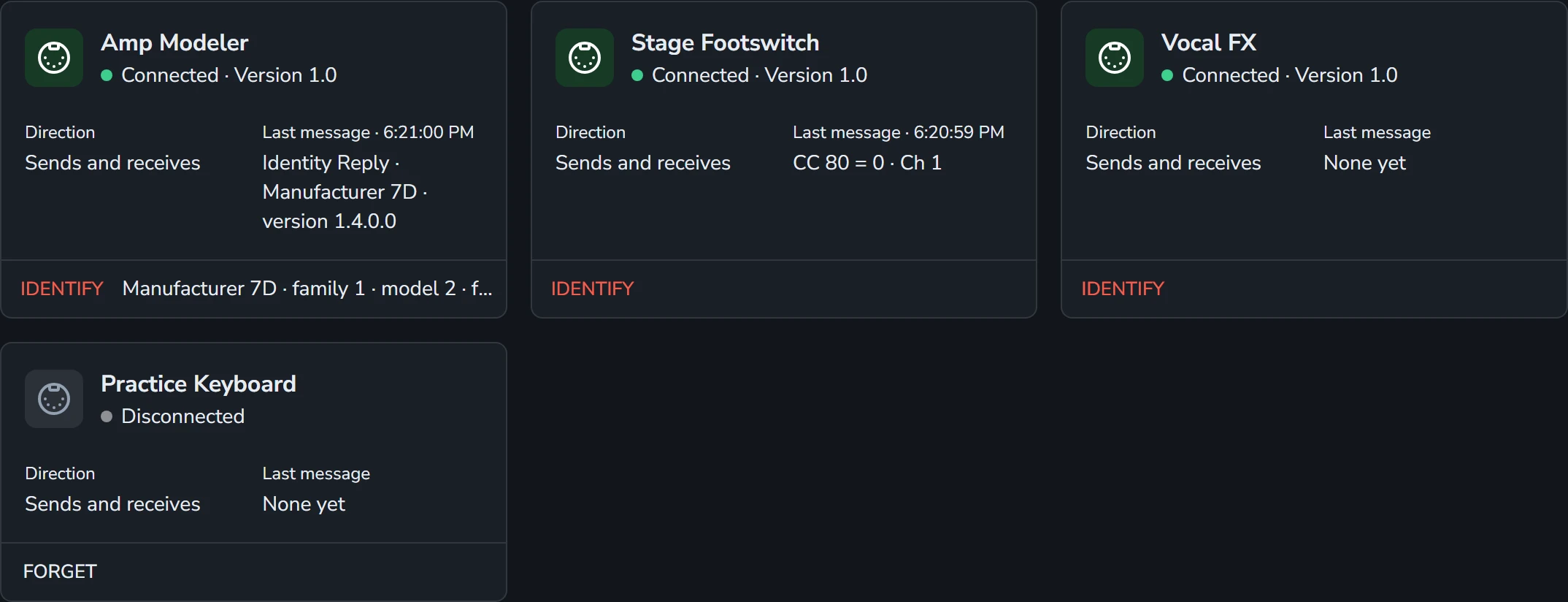
Each device has a card of its own, with the connected ones first.
| On the card | What it shows |
|---|---|
| Name | The name the device gives itself. |
| Status | Connected or Disconnected, with the maker and version when the device reports them. |
| Direction | Sends and receives, Sends only or Receives only. |
| Last message | The last MIDI message to or from the device, and when. |
A device stays on the list after you unplug it, so you can still choose it when you set up a command. Songstead knows a device by its name, so two identical devices with the same name count as one.
Identify
Identify asks a connected device what it is. A device that answers shows its maker, model and firmware beside the button.
Forget
Forget takes a disconnected device off the list. A device that a trigger, saved command or remote control uses can't be forgotten, and its card says what's using it.