
Docs / Songs
Keys, capo and transposing
Songstead can play any text chart in any key. You never have to rewrite a chart to change its key: the chart stays the way you wrote it, and Songstead works out the new chords every time it shows it.
Two keys: written and performed
Every chart has two keys, and it helps to keep them apart.
| Key | What it means | Where you set it |
|---|---|---|
| Written Key | The key the chart's chords are written in. | While editing the song, with the chart. Songstead fills it in from the chords when you paste a chart. |
| Performed key | The key you actually play the song in. | Key in the song's Performance card. |
When the two are different, Songstead moves every chord from the written key to the performed key.
If a song has no written key, the Performance card says Missing Written Key, and the chart can't be transposed until you set one while editing the song.
Change the key

The Performance card is beside the chart on a computer. On a tablet or phone, it's in the Settings & Tools panel, which opens from the button at the bottom right of the chart.
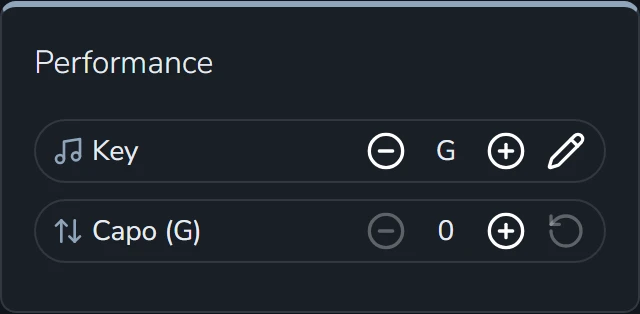
The − and + buttons beside Key move the key down or up a half step at a time, and the chart changes as you go.
The pencil opens a list of every key to choose from. The chart changes behind the list as you pick, so you can read the result before you select Save. Cancel puts it back the way it was.
Outside a set, the key you choose is yours alone. Other people in your group keep seeing the song in their own key.
Capo and transpose
The second row of the Performance card is either Capo or Transpose, depending on Transpose Mode in Settings.
| Transpose Mode | What the row does |
|---|---|
| Capo | Sets a capo fret, from 0 to 12. Songstead shows the chord shapes to play with the capo on, and the row shows which key those shapes are in, like Capo (G). The song still sounds in the key you chose above. This is the default. |
| Unrestricted | Moves the whole chart up or down by up to 11 half steps, which suits keyboards and other instruments without a capo. |
The reset button at the end of the row puts it back to zero.
Your capo or transpose is always yours alone, inside a set and outside one.
An example
Say a song is written in A, and you'd rather play G shapes with a capo. Leave the key on A and set the capo to 2. The row shows Capo (G), and the chart shows G shapes. It still sounds in A, so the band doesn't have to change anything.
Keys in a set
A song in a set has its own key for that set, and everyone who can see the set sees that key. Changing it only changes that set. The song itself, and every other set it's in, stay as they were.
When you add a song to a set, it starts in the key you play it in, or the chart's written key if you've never changed it.
Key changes inside a song
A {key: A} line partway through a ChordPro chart marks a key change. Songstead shows it in the chart and moves it with everything else, so a song that goes up a step still goes up a step in any key. See ChordPro and chords over lyrics.
PDF and image charts
A PDF or a photo of a chart is shown exactly as it was uploaded, so it can't be transposed. You can still set its written key, as a note of what key the file is in.